Skip to content

The web app for construction and trade businesses

IVOLOG Construction site reports for site managers and the office.

Employees record additional work, customer requests and deviations on site using voice notes and an optional photo, linked to the project. Site managers and office staff can find, review and manage the related cases in one place.

Record on site → Link to the project → Follow up in the office

No credit card · No installation · Data separated by business

Example workflow · fictional data

Damage is spotted on site.

01 — Report from the site
An employee records: “The roof membrane is damaged. Please check it before work continues.” She can add a photo if needed.
02 — Linked project
South roof renovation
03 — Case for site managers and the office
The report can be found under the project. Site managers and office staff open the case, review its contents and set its status – for example, to “Under review”.

On site

Record a voice report

Record a voice note for the selected project and add a photo if needed. Your observation stays linked to the right site.
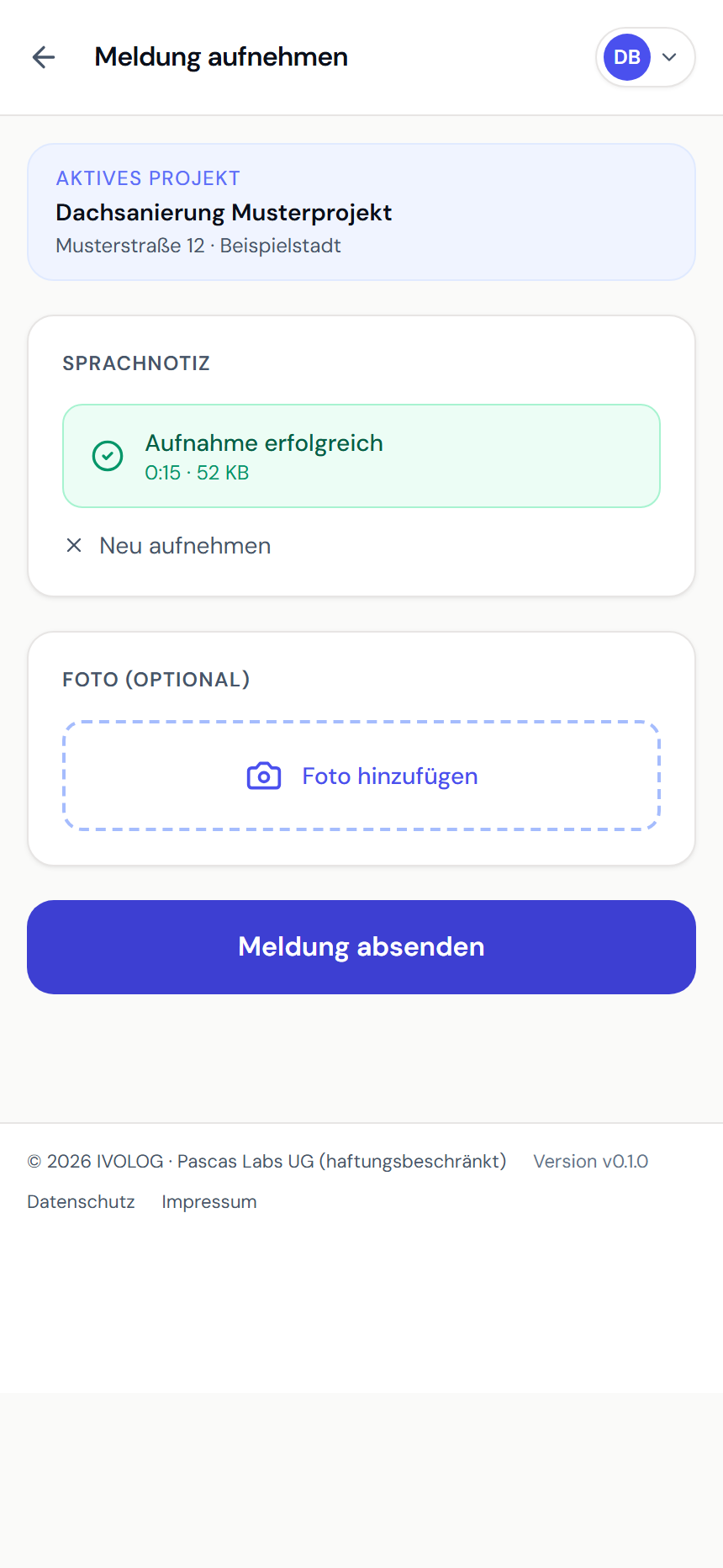
Recorded site voice note in the Altbau Zentrum demo project, with options to add a photo and submit

For site managers and office staff

Review the report

Review the report using its summary and transcript. Set the case status, for example Under review or Approved.
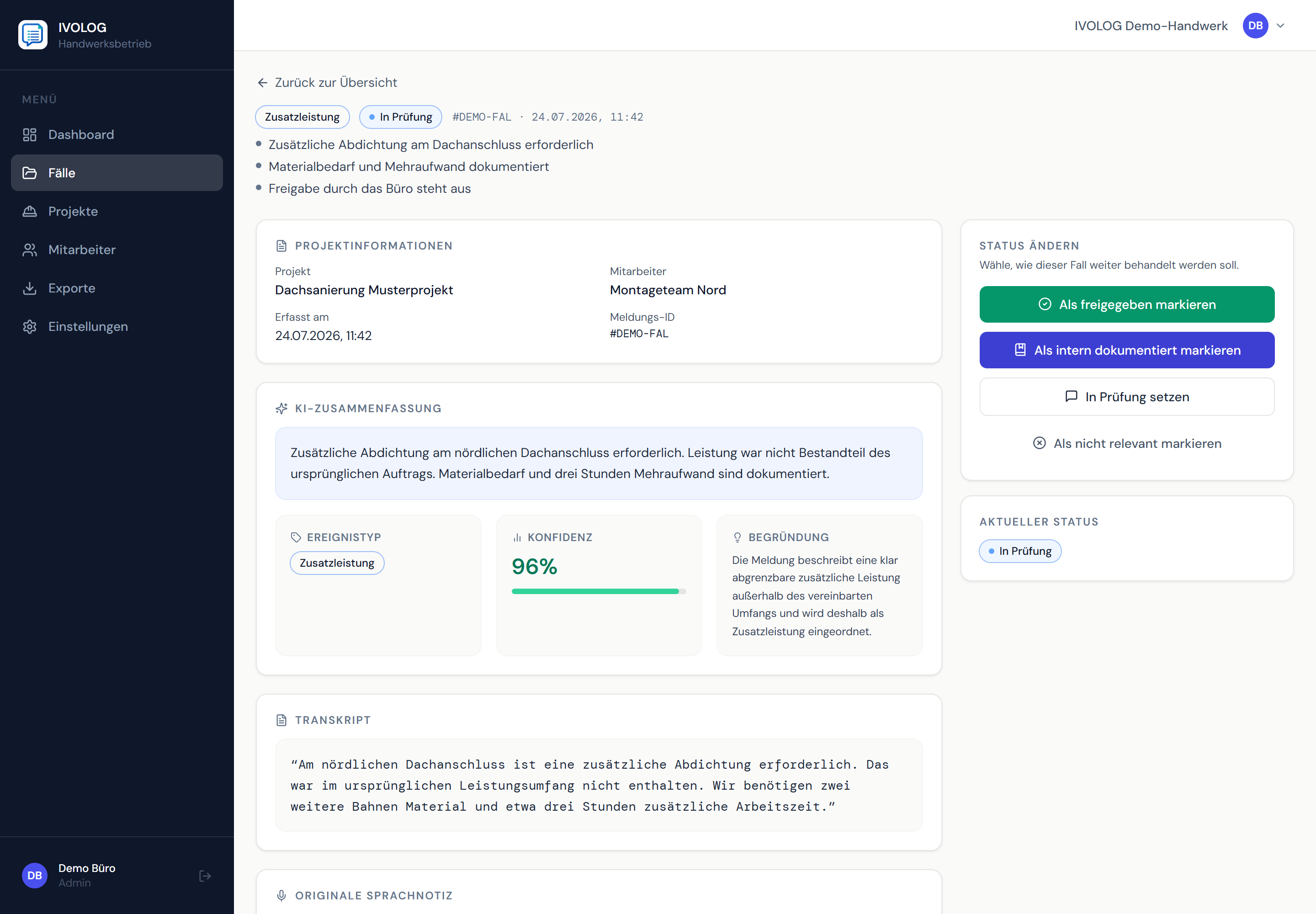
Set the case status: approve, document internally, set to under review or mark as not relevant

Everything with the project

Project overview

Project details, team and related cases stay together. The status overview shows what is open or has already been processed.
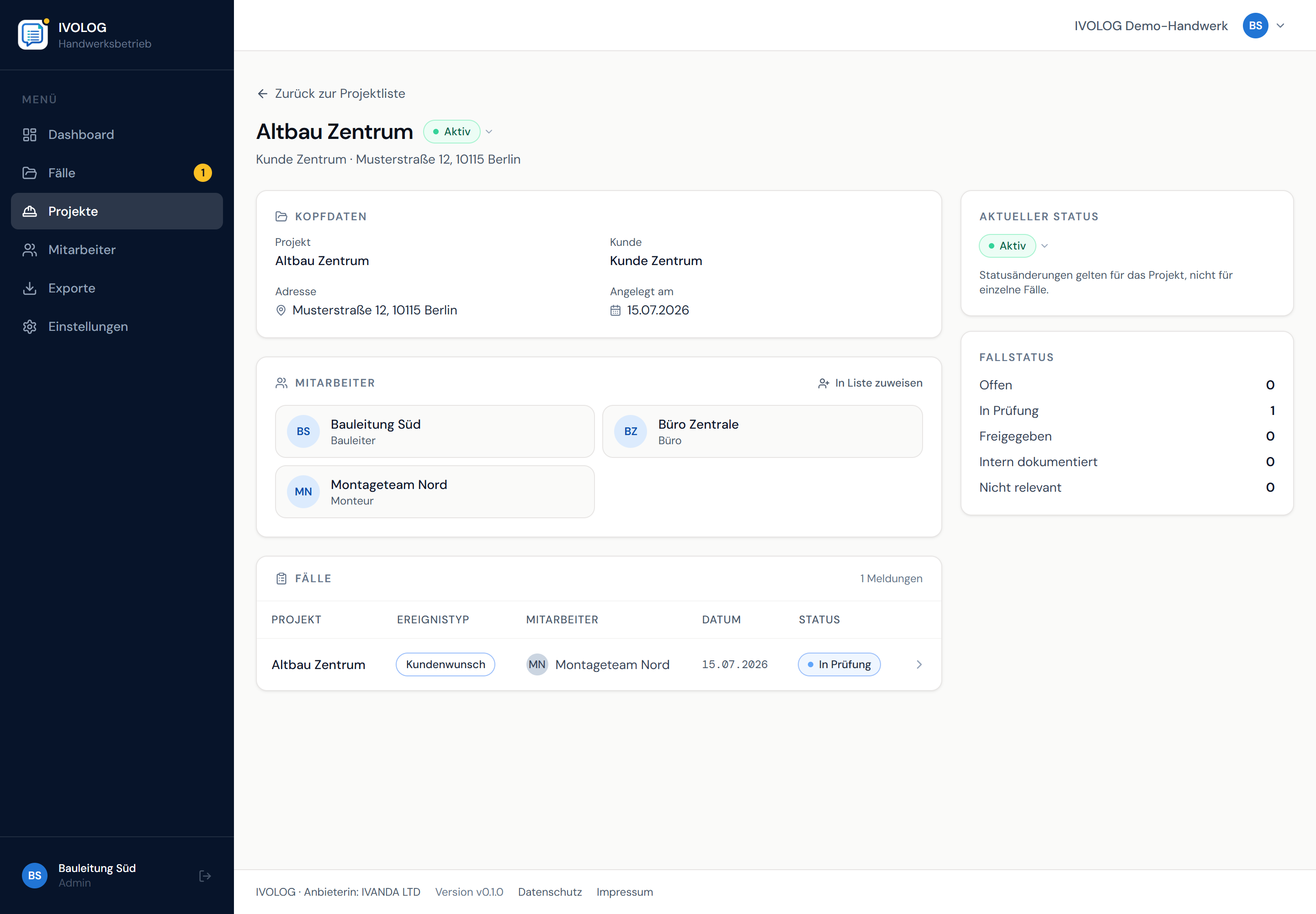
Case status in the project: open, under review, approved and internally documented cases

Example views with demo data. Product screenshots show the German interface.

Connect the site, site management and the office: Construction site documentation with IVOLOG

01 — How it works

Ready to start the same day.

No setup project, no training. Register your business, invite your team and record your first voice report.

01

Set up your business

Register your business and create your first project.

02

Add your team

Invite employees to submit site reports using an invitation link.

03

Create your first report

Select a project, speak and add a photo if needed.

02 — Who it is for

Clear reports for site teams and the office.

From the construction site to site managers and office staff: keep reports and their project context together.

03 — Trust and technology

A clear basis.

IVOLOG supports the handover of reports between the site, site management and the office. Details about the provider, processing and contracts can be found in the legal information.

Separate business data

Business data is processed with technical separation between businesses.

From voice to case

IVOLOG transcribes reports and assigns them an event type.

For the site and the office

Project-based cases support the handover for further processing.

04 — Pricing

Clear pricing for the site and the office.

Choose a plan based on the office and site users you need. All features of each plan are listed transparently.

MonthlyAnnuallySave up to 15%
Starter

€59.00/ month

Billed annually · Annual total €708.00 net · You save €120.00 compared with monthly billing

For small businesses with one office user and a team on site.

Included access

1 office user for administration and site management

Up to 5 site users for the on-site team

TeamPopular

€119.00/ month

Billed annually · Annual total €1,428.00 net · You save €240.00 compared with monthly billing

For growing businesses working on several sites at once.

Included access

3 office users for administration and site management

Up to 10 site users for the on-site team

Pro

€199.00/ month

Billed annually · Annual total €2,388.00 net · You save €360.00 compared with monthly billing

For organised businesses with a higher volume of work and clear processes.

Included access

5 office users for administration and site management

Up to 20 site users for the on-site team

Included in every plan

  • Capture voice reports
  • Automatic transcription
  • AI classification
  • Dashboard and overview
  • Status workflow
  • Filter and search
  • PDF and CSV export
  • Invitation links for employees

All prices are net, plus statutory VAT. With annual billing, the displayed monthly value is an equivalent monthly rate; the annual amount is billed once a year.

  • Try free for 14 days
  • No credit card required
  • No setup required
  • AI included under fair use
  • Data separated by business

05 — Frequently asked questions

Before you start.

The key answers at a glance.

Where is my data stored? Are audio recordings retained?

IVOLOG technically separates each business's data. The services used, processing purposes and deletion periods are documented in the privacy policy. Audio recordings are processed for transcription; transcripts and cases remain available in the account for editing and export.

How can I cancel? Is there a minimum term?

The contract term and billing interval depend on the selected plan. Unless a different minimum term has been agreed, you can cancel at the end of the billing period already paid for. Cancellation is available through the designated function in IVOLOG or by email to IVANDA. For plans expressly designated as annual or fixed-term plans, the terms and renewal arrangements stated when the contract was concluded apply.

Which AI does IVOLOG use, and how reliable is it?

We use OpenAI Whisper for transcription and GPT-4o-mini for classification. Recognition is designed for typical site reports; office staff or site management should briefly check important cases. Uploading and processing currently require an internet connection.

Do my employees need to install an app and remember passwords?

No. You send an invitation link via WhatsApp, the employee taps it and goes straight into the app — without an account or password. IVOLOG runs in the browser as an installable web app. The steps are deliberately kept short: press the button, speak, done.

Can I change plans later as my business grows?

The pricing overview shows monthly and annual billing. For questions about a later plan change, contact us at support@ivolog.com.

Do I need special hardware or particular phone models?

No. Any smartphone or tablet with an up-to-date browser (Chrome, Safari, Firefox) is sufficient — iOS 15 or later, Android 10 or later. No app-store installation is needed; IVOLOG is used as an installable web app directly via ivolog.com. Desktop sign-in for office staff works in any browser.

Can I export my cases? In which formats?

PDF and CSV exports are available for documentation and further processing. The data included depends on the case and the content recorded.

How do I get help if something does not work?

You can reach us at support@ivolog.com. We respond as quickly as possible on business days. Telephone support is not included.

06 — Get started

Ready to bring order to your site reports?

Create account

Start for free. No credit card. Create your first report directly in the browser.